Showing posts with label Leeds Beckett. Show all posts

Saturday, 23 May 2015

Advanced Animation and VFX Week 14-2

I'm preparing for my hand in tomorrow, so I will review my Animation piece with what feedback I gathered online. Also, I will showcase my Showreel.

My showreel features music from Norwegian band Flare, a band I became friends with a couple years ago. I'm actually featured in their second album under the Thanks section! They're a band I got to know while working as a volunteer on my hometown's radio station, where I was a regular broadcaster which featured bands from across the world who weren't household names and who I had become friends with through Myspace (yes, it was that long ago)

I am friends with the band members on Facebook, where I messaged the band's singer, who wrote the song. Truls Marius Dale (Tiam Dee).
When I had asked one of my lecturers how I could show I had got permission to use a track from a band, he had told me so long as it was in writing, it was fine! Flare are an excellent group of musicians from Bergen, Norway. Thanks to Truls Marius Dale, I was able to have an upbeat, happy rock/pop track to my animation. I was able to have some of the animation hit beats well which really emphasises the animation, I feel, as do those who have seen my reel. Former animation student Alex Wright was not only impressed with how the music complimented my animation style, but also the quality of the animation shown and the range of skills I have shown.

Reviews of the Wrestling piece were very positive! I mainly got feedback from the website Newgrounds.

Newgrounds gives a visual rating on the page out of 5 stars. The piece has been up since Monday 18th May and has scored 3.68/5

Animator Rob Yulfo (Freelance animator who has been featured on Comedy Central's Trip Tank) said of the piece that it reminds him of Rockem Sockem Robots, which is something I've heard a couple times since selecting those models. Of the animation, he told me that it is of very good quality. As someone who has worked with Maya in the past, he knows how tempting it is to have the camera floating through the scene, which is something I actively set out to avoid since the beginning. My choices of camera angles played the piece well, showing the Face Character being on the back foot until he manages to reverse the Curb Stomp, where the camera is a low angle for the Heel character, emphasising the danger for him.

Simon Jobson, who has experience with animation for web design, commented on the fluidity of the secondary movement and the emphasis before moves are performed. He also followed up with a quote of South Park, "That's not real Wrastling!"

Newgrounds user Mighty Dein complimented the careful attention to the poses within the piece which created an excellent animation for character interaction.

Another user Maddude13pt2 wished I had actually made a full 3 minute short of the fight, suggesting that in the future, maybe think of doing a collaboration with other animators to lighten the load of animating it all.

The reviews were ranged between 3-5 stars, with the overall rating being based off of the views where the users rated (not reviewed).

Monday, 18 May 2015

Advanced Animation and VFX Week 14-1

FINAL PIECE

Breakdown 01
Breakdown 02

I broke the breakdown into 2 parts as they look at solo animation and interaction animation in their own sections.

Sunday, 17 May 2015

Advanced Animation and VFX 13-2

Animation and Breakdowns are completed! I'm going to be uploading them tomorrow for feedback and what not from the general public rather than lecturers and peers.
The animation Breakdowns that I looked at to see how they are arranged:
https://youtu.be/2z_k2z5m6H0 - Bobby Pontillas, Frozen
https://youtu.be/l9uaH6bXI4k - Patrick Giusiano, Epic
https://youtu.be/l-S7wQx_hvs - Jamaal Bradley, Tangled
https://youtu.be/szJ9Ohi2FNo - Daniel Peixe, Frozen (Sven)
I found these breakdowns to be the best examples of how to lay out my breakdowns, from 2D planning to the final render.


Friday, 15 May 2015

Advanced Animation and VFX Week 13-1

I've been working on my Reel this week, looking at what pieces I would like to use in it, finding music I would like to have over it, things like that.

Sunday, 10 May 2015

Advanced Animation and VFX Week 12-2

I set the textures and renderer for Linear Workflow and got After Effects ready for Linear, too. When rendering an image using the .exr file format, you must change your framebuffer type to 32-bit float or 16-bit half float. Otherwise, your image will be clamped to [0, 1]. I had my renders at 32 bit Float. 
I've mostly been recovering from the Showcase! My legs still hurt...

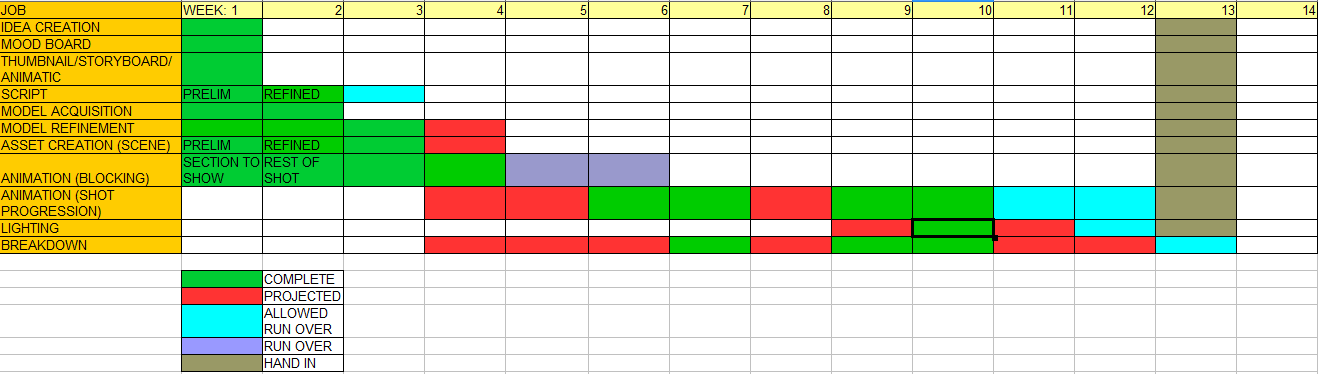
The hand in has actually changed from where it says on this Gannt chart. I also fixed the Face character's hand at the end of the piece.

Wednesday, 6 May 2015

Advanced Animation and VFX Week 12-1

I was part of the End of year Showcase  yesterday! So some of Sunday and all of Monday was spent getting my video ready for that! It was a great opportunity to get my work reviewed for both Production Project and this piece as I had a section of mostly finished work in my video. It wasn't set for Linear Workflow, though.

Sunday, 3 May 2015

Advanced Animation and VFX Week 11-2

Working with a Linear Workflow? I will be! I had got some feedback from an animator friend of mine asking if I had been working with a Linear Workflow for my Production Project and he told me to look it up for future projects, so I've been looking that up.
https://youtu.be/pf5kDcehYXA This video explains it quite well, I found. It even helps you set up the Maya scene for Linear Workflow!

Working towards the last stretch! All I have to do now is a tiny bit clean up and get the scene ready for Linear Workflow! From there, it's the breakdown!

Wednesday, 29 April 2015

Advanced Animation and VFX Week 11-1

I've changed my script up a bit now, because with what actually shows on screen, I can really get into the commentator character! I've been thinking of going for a classic WWF commentator voice, like along the lines of Good Old JR, Jim Ross.

Sunday, 26 April 2015

Advanced Animation and VFX Week 10-2

Lighting completed with cameras and clean up.
I need to correct one of the lights which is shining very harsh on the character.

Nearly at the end! I have a little bit of animation to tidy up, but that will be it, I think! Then it's just focusing on the Breakdown!

Wednesday, 22 April 2015

Advanced Animation and VFX Week 10-1

I've been looking at lighting in the scene. As the characters are moving around, I don't want the lights to be moving around, as this could cause some very strange lighting effects, which I would like to avoid.
One of the best resources in easy to understand cinematography in my opinion is Film Riot on Youtube. I have been using their tips and tricks for a couple years now and I love how they break everything down to be very understandable for the average viewer.
https://youtu.be/fUsTpUzOhFY I used this Film Riot video to learn tips on how to light moving characters

I sketched out the placements in the scene. Using different pens, I would draw where the characters were, where the camera would be and this would give me an idea of where I could place lights to give the best coverage, as too many lights would slow down rendering if they aren't needed. If characters are in the same area twice, I will only need to use 3 lights to give the best lighting coverage, as I use 3 point lighting in my scenes, as I find they give the best results. I look at my scenes as a stage and employ techniques used in theatre to get the best quality of image. Theatre often uses three-point lighting to excellent effect, Where it differs from theatre is that I can easily have the lights move through the scene with the camera, whereas in theatre, the audience are effectively the camera.

The three lights are referred to as Back light (obviously behind the subject), this separates them from the background when used in conjunction with the Key light which shines directly on the subject and the Fill light, which is placed relative to the Key light and shone from a lower angle.

Sunday, 19 April 2015

Advanced Animation and VFX Week 9-2

Second section cleaned up, too!
Again, I'll go back through these and clean them up further

Back on track, now. Production Project, for the most part, is over. It's just the review for it, which is fine. My time can really be spent on this project, now. I have a lot of catching up to do!
Status: It's looking up!

Wednesday, 15 April 2015

Advanced Animation and VFX Week 9-1

I've done all the clean up for the first section! I still want to go back through it, though for another Clean Up.
But second clean up will be a shorter process.

Saturday, 4 April 2015

BONUS WEEK! Advanced Animation and VFX - Easter Holiday Edition

Well, I wanted to get a good week of working on this project done, but it's kind of just fell to only doing a couple hours on it. Yep, it's that bad for the other project. But it's getting there! I'm actually looking a bit more hopeful for this one as a result! I did a little more Clean up and with hand in being next week for Production Project, the rest of my time will be a solid effort!

I've also been looking at the camera techniques used in action sequences.
As wrestling is filmed live, the camera operators are getting shots as and when they can. In film, the cameras are strategically placed to give the audience the best shots possible. The same is with the lighting. I was originally going to mimic the lighting set up in the WWE, but this doesn't give the best lighting effects, especially when digitally, I can do ANYTHING with lighting.

Fight scenes in films will be an invaluable source of camera reference. Wide angle shots and in close tight shots for certain moments, like the pin. A couple great examples follow

https://www.youtube.com/watch?v=mjx-02XWuzk
Hulkbuster scene - Avengers: Age of Ultron

https://www.youtube.com/watch?v=x0p7TS7I728
Narrator vs Angel Face - Fight Club

https://www.youtube.com/watch?v=vV3i2SeXhSM
The Ram Vs Ayatolah - The Wrestler

https://www.youtube.com/watch?v=Z1PCtIaM_GQ
Jackie Chan's fighting and comedy - EXCELLENT

https://www.youtube.com/watch?v=kXFBggMSgo8
Jean Claude Van Damme - Frankie Dux vs Chong Li final fight - Bloodsport

Jackie Chan brings up an excellent point about filming fighting scenes. The camera changes on the hit, as the actors cannot fight, whereas he can, so the camera doesn't switch. In animation, there's no need for stunt doubles or anything like that. Because of this, I can keep the camera in a good position and show the character getting smacked around!

Sunday, 29 March 2015

Advanced Animation and VFX Week 8-2

Kill me now.
If it can go wrong, it will go wrong.  At least I have two weeks to focus solely on work. I've managed to fix the issue with my Production Project piece, but it's taken time away from this project again.

No animation done for it just yet.
Status: I want to give up.

Wednesday, 25 March 2015

Advanced Animation and VFX Week 8-1

I've received a giant punch in the face from Production Project this week, so I've not had a whole lot of time to work on it just yet, moving from Stephen Brooks' feed back. I have, however been looking further into the 180 Rule. I just can't bring myself to open Maya... At least it's nearly Easter Break...

Sunday, 22 March 2015

Advanced Animation and VFX Week 7

No Update so far, as Production Project has put me into hell... So I'm now another week behind. I have begun clean up, and cameras, but a friend of mine said he wants to have a work with me tomorrow with regards to my storyboards, so I'll update this post with that.

UPDATE: 7-2 (though, I guess technically Week 8...) 2Feedback from animator Stephen Brooks of Rubber Onion Animation on my Storyboard pointed out some slight mistakes that I really should have noticed when I made it, but with good reason for making them! As I was using reference footage from a live event, cameras are used as and when they can get a good shot, they don't follow the standard rules for cinematography, like the 180 Line rule, which I crossed.
Brooks told me in a Skype call that from my Storyboard, I should flip panels 1 and 2 on Page 1. This is because usually, the bad guy (heel) is on the right of the screen, moving left. The good guy, left moving right. When crossing the 180 Line, you need to show this in camera, so from panel 5, show the Heel running to the left. Panel 6, have the Heel character slightly left of middle, moving right, with the face in the middle. For the slow motion, think Zack Snyder. Starts real time, goes slow motion as the character comes into frame. For the final sequence, think of using a different Pin. Something staged differently that keeps the positioning of the characters, good left, bad right. A suggestion was either the face throws the character up in the air, letting him drop (a la Mark Henry) or he just dumps the Heel and goes for the pin, having the Heel's head in the centre of frame, body to the right, then the Face, when pinning, have his head middle and his body to the left.

Before the Skype call, he messaged me in in a Facebook PM. It's a continuation of what I had posted for review, which he explained further in the call.


So, changing my storyboard would create an animatic like this

Breakdown has begun progress, though I guess I could have counted last week as starting it, too, since the block ins will count as part of the breakdown? A little bit of clean up has begun.

Status: Slight slope downwards...

Sunday, 15 March 2015

Advanced Animation and VFX Week 6-2

I continued on to block in the rest of the piece. Again, some more editing is needed when Cleanup comes in.
Feedback from a freelance animator friend of mine suggested a different move, instead of the GTS as was originally going to be done.
Updated Gannt Chart. So with problems with the Production Project, I've not had as much time as I would like to have to work on this piece. But it has allowed me time to get some more reference footage, which in the long run, will help. Blocking in has run over as a result. This has taken two and a half weeks from me for clean up, but I gain two weeks from the Easter Holidays! I plan to have one week dedicated to this project and one for the Production Project (as this is presented right after it).

Status: Can Handle This.

Wednesday, 11 March 2015

Advanced Animation and VFX - Week 6-1

Blocking in the First section of the sequence.
Focusing on the key poses and the timing of the piece. I'll have to go back and fix a couple areas which need speeding up when I go back and Clean up the piece.
No cameras or lights are added into the piece yet, I just want to get the blocking done.

Sunday, 8 March 2015

Advanced Animation and VFX Week 5-2

https://www.youtube.com/watch?v=uRWUTNHucjA

Animation from 2K's WWE2K15 of Seth Rollins. Rollins is the wrestler who I am basing my heel character on, who does the Curb Stomp. A good angle in this video for reference.

Advanced Animation and VFX Week 5-1

This week was catching up with some texturing.
I created the CMANIM wrestling apron and textured the ropes and barriers. The stairs are a solid coloured Blinn material, so it has specular.

Having been focusing on the Production Project due to some issues, I have been behind on the projected animation, but as the next stages are focusing on Animation and any pieces that need fixed up on the modelling side of things, I am not massively worried and I'm certain I'll be able to get the animation done to a high standard in the remaining time.

Week 5 Gannt Chart.